
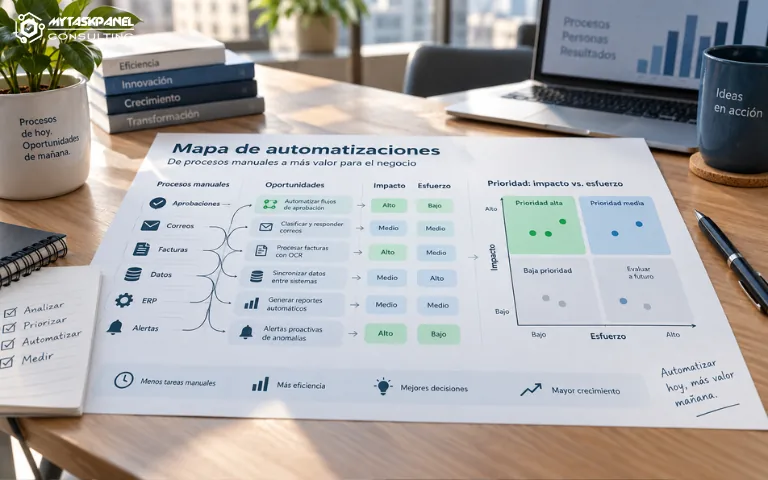
Many companies know they have manual processes, repetitive tasks, and poorly connected tools. They also know that part of this work could be automated. The problem is often deciding where to start.
Automating without a clear vision can lead to isolated solutions, difficult-to-maintain workflows, and new dependencies. An automation map helps organize opportunities and prioritize those with the greatest business impact.
What is an automation map?
An automation map is a structured view of the processes that could be automated within a company. It is not simply a list of tasks. It is a tool for identifying opportunities, assessing their impact, estimating their complexity, and deciding the order in which they should be addressed.
It helps move from the general idea of “we need to automate” to a more concrete plan: which processes involve the most manual work, which generate the most errors, which affect customers, which depend on scattered information, and which can be improved with relatively little effort.
Why shouldn’t you automate without prioritizing?
When a company starts automating without clear criteria, it often chooses the most visible processes or those generating the most complaints at that moment. This may produce short-term improvements, but it does not always solve the most important problems.
A quick automation may save a team time while creating a new technical dependency. It may also solve a symptom without addressing the underlying process. Or it may connect tools in an improvised way, making future changes more difficult.
Automation should not consist of adding workflows on top of poorly designed processes. It is better to first understand what is happening, why it is happening, and what value changing it would bring.
Which processes are usually good candidates?
Repetitive and frequent tasks
These are activities performed many times a day or week, following similar steps. Examples include copying data between systems, generating documents, updating statuses, or sending internal notifications.
If a task is repeated frequently and does not require complex judgment, it may be a good candidate for automation.
Processes with frequent errors
When a manual process generates recurring errors, automation can provide more than time savings. It can also improve quality and reduce the need for subsequent reviews.
This is common in data validation, invoicing, order management, reporting, or document processing.
Workflows with unnecessary delays
Sometimes a process is not particularly complex, but it becomes blocked because someone needs to manually review, forward, or update information.
Automating certain steps can reduce waiting times and improve coordination between teams.
Customer-facing processes
When a manual task delays a response, delivery, or confirmation, the impact goes beyond internal efficiency.
Automation can improve the customer experience and reduce commercial or operational friction.
Activities that consume the time of key roles
If people in technical, commercial, or management roles spend too much time on administrative tasks, there is a clear opportunity.
The goal is not only to save hours, but also to free up capacity for higher-value decision-making.
How should each opportunity be assessed?
An automation map should analyze each process according to several criteria. The first is impact. It is useful to estimate how much time could be saved, how many errors could be avoided, which teams would benefit, and whether the customer experience would improve.
The second is effort. Not all automations have the same level of complexity. Some can be implemented by connecting existing tools. Others require system integration, data cleanup, or custom software development.
The third criterion is risk. A workflow that affects invoicing, sensitive data, or customer communications requires more control than a low-impact internal automation.
Technological dependencies should also be assessed. If a process relies on data from multiple systems or tools without APIs, the technical foundation may need to be prepared first.
Finally, scalability should be considered. An automation may solve a current problem, but it should also be able to adapt if volume increases or the underlying tools change.
Quick automations and strategic automations
Not all automations serve the same purpose. Quick automations solve specific problems with relatively little effort. They may be used to send alerts, update records, create tasks, organize information, or generate simple reports. They are useful because they deliver visible results and help the organization build confidence in automation.
Strategic automations have a deeper impact. They may connect entire departments, integrate critical systems, reduce manual steps in key processes, or transform how an operation is managed. They usually require more analysis, but they also generate greater value.
A good automation map should include both types. Quick improvements allow the company to make progress from the start, while strategic initiatives build a stronger long-term evolution.
The role of data and integrations
Many automation initiatives fail because the underlying data is not ready. If every system uses different formats, fields are incomplete, or there is no clear source of truth, automation can multiply errors instead of reducing them.
Before implementing certain workflows, it may be necessary to organize data, define ownership, review permissions, or build more stable integrations. This is especially important when a company wants to incorporate artificial intelligence. AI can help classify, summarize, or recommend actions, but it requires reliable and accessible information.
How do you turn the map into a roadmap?
Once the opportunities have been identified, the next step is to put them in order. It is not always advisable to start with the most ambitious automation. In many cases, it is better to combine a quick improvement with a more strategic initiative.
The roadmap should specify what will be automated first, which dependencies exist, which systems are involved, who is responsible, and which metrics will be used to evaluate results.
It should also include maintenance. Automations are not solutions that are created once and then forgotten. Tools, processes, data, and business needs all change over time.
The role of CTO as a service
A CTO as a Service can help prevent automation from becoming a collection of isolated solutions. Their role is to provide technological judgment and business perspective: identifying which processes should be automated, which tools are appropriate, which integrations should be prioritized, and which risks need to be controlled.
They can also help define a realistic roadmap, coordinate providers, and avoid unnecessary investment in solutions that are too complex for the company’s current stage.
An automation map makes it possible to prioritize with clear criteria, avoid isolated developments, and turn automation into an organized process of technological evolution.
At MyTaskPanel Consulting, we help companies identify opportunities, design automated workflows, and integrate systems with a solid technological approach. Do you know your company could automate more processes but are unsure where to start? Contact us and we’ll help you build a realistic, actionable automation map.
'/%3E%3C/svg%3E)
'/%3E%3Cpath%20fill='%23b2b2b2'%20d='M241%20382q0%2016%2017%2026%2017%2011%2042%2011t42-11q16-11%2017-26V269H241'/%3E%3Cpath%20fill='%239f7e00'%20d='M241%20379q0%2014%208%2023%209%209%2021%209%2014%200%2021-9%209-9%209-23V269h-59'/%3E%3Cpath%20d='M241%20339v-70h59v110q0%2014-9%2023l-6%205v-68h-15v72q-8%200-14-4v-68zm59%2040c0%2022%2015%2032%2029%2032%2021%200%2030-18%2030-32v-40h-59'/%3E%3Cpath%20fill='%239f7e00'%20d='M266%20277v5h2v12h-3v-5h2v-5h-9v5h2v5h-4v9h3v18h-5v10h34v-10h-5v-18h3v-9h-4v-5h2v-5h-9v5h2v5h-3v-12h2v-5zm42%20101q0%2010%206%2017%206%206%2015%207%2010-1%2016-7%206-7%206-17v-29h-43'/%3E%3Ccircle%20fill='%230044ad'%20cx='329.5'%20cy='372'%20r='6'/%3E%3Cellipse%20fill='%230044ad'%20cx='300'%20cy='340'%20rx='16'%20ry='21'/%3E%3C/svg%3E)
