Your system doesn't have to fail to hold your business back. Make it easy to change again.
Some software has supported business operations for years and still does its job. The problem starts when every new requirement takes too long, costs too much, or involves too much risk. We modernize the underlying technology so you can keep evolving without starting from scratch.
Age is not the problem. It is everything that becomes harder.
A system can keep running for years. The warning sign is when doing something new requires too much coordination, specialist knowledge or risk.
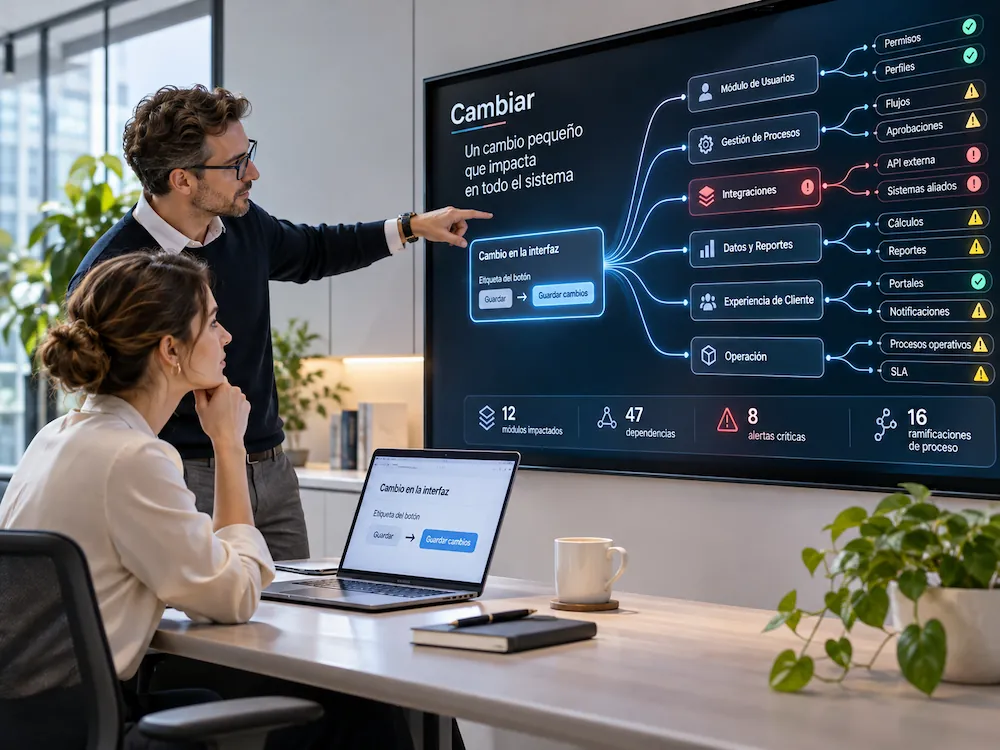
A simple improvement ends up affecting too many components.
What should be a quick change starts requiring meetings, testing and specialist knowledge. Not because the improvement is complex, but because the system makes change difficult.
You don't have to change everything. Focus on what holds you back most.
Modernization can start with one specific part of a system or involve several layers. What matters is targeting the changes that unlock the greatest capacity and reduce the most risk.
What customers and teams use.
Interfaces, user experience and visible workflows. Sometimes the friction lies in what people use every day.
The logic that is hard to change.
Business rules, internal processes and core functionality. This is often where the complexity slowing down every improvement lives.
How it connects with other systems.
Integrations, APIs, third-party systems and dependencies. When connecting something new becomes too difficult, this is often where change is needed.
The foundation that supports and protects the system.
Infrastructure, environments, frameworks, libraries and critical components. We update end-of-support technologies, address vulnerable dependencies and strengthen the technical foundation to reduce risk and make the system easier to evolve.
Not everything needs modernizing. And not everything has the same urgency.
Before changing technology, we look at the intersection of business value, the difficulty of evolving and risk exposure, including vulnerabilities and unsupported technologies. That is often where the best starting point becomes clear.
It works well. And the risk is under control.
If it works, does not hold the business back and carries acceptable risk —with active support or suitable safeguards—, there is no reason to change it simply because it is old.
Internal reportingIt matters. But it slows or exposes the business.
If a critical component hinders progress or carries growing security risks, modernizing it may be a priority.
Critical systemIt is inconvenient. But the impact is limited.
Not every technical issue requires immediate action. Deferral makes sense only when there are no security risks requiring action.
Supporting toolIt is obsolete. Maintaining it no longer makes sense.
When a component is out of support and keeping it is no longer worthwhile, replacing it may be the better choice.
Legacy componentWe are not chasing the most impressive-looking architecture. We focus on removing the friction and risks that make it harder to change, connect or grow, even when the system is still working.
We identify friction, vulnerabilities and unsupported components.
We prioritize by impact, exposure and criticality—not age alone.
We update, isolate, modernize or replace according to the actual risk.
You don't need another audit. You need to know what comes next.
The first phase should reduce uncertainty, not produce a document that no one ever opens again. The outcome is a clear decision on what to address, why it matters and what the first move should be.
Modernization decision
Priorities are driven by business impact, not simply by the age of the technology.
Which parts of the system concentrate dependencies, cost, risk or difficulty making changes.
Which intervention can deliver the most value without turning it into a larger project than necessary.
What to keep, what to modernize, what to replace and where to hold off on investment for now.
A clearly defined scope to validate the direction before increasing investment and complexity.
Application migration is about more than moving code. It means choosing the right direction.
GsGestion needed specialist support for migrating its applications and defining its technology stack. A practical example of why modernization starts with sound decisions, before any components are changed.
Identify what really needs to change.
An effective migration does not start with choosing a technology. It starts by understanding which applications are in place, what constrains their evolution and which requirements must be respected.
Establish a clear technology direction.
A key part of the work involved defining the technology stack that would support the migration and provide a foundation for the applications to evolve further.
Guide the transition with sound technical judgment.
Technology is only one part of the equation. Value also comes from maintaining clear communication, shared context and consistent decisions as the applications move to their new technical foundation.
Technologies listed by MyTaskPanel for the GsGestion case.
Three especially important elements when changes affect existing applications.
Has changing your software become too difficult?
You don’t need to decide how to modernize it today. First, let’s understand what’s holding you back.
Tell us about your current system, what you want to achieve, and where the challenges arise. We can help you identify what should stay, what needs modernizing, and where to begin.
Explore real projects →
Tell us what you need to modernize.
Briefly describe your situation. We’ll review your enquiry and get back to you to discuss the next steps.